> ## Documentation Index
> Fetch the complete documentation index at: https://docs.nordiska.com/llms.txt
> Use this file to discover all available pages before exploring further.
# Integration Flow
> Technical integration flow for card onboarding implementation
This guide walks through the technical integration flow for implementing card onboarding in your application.
## High-Level Process
The card onboarding integration follows a webhook-driven asynchronous pattern, allowing your system to react to state changes in real-time:
```mermaid theme={null}
sequenceDiagram
participant Customer
participant Partner
participant CardService
participant SigningService
participant Enfuce
Customer->>Partner: 1. Initiate card application
Partner->>CardService: 2. POST /api/v4/engagements/card/onboarding
Note over CardService: Status: PROCESSING
CardService->>CardService: 3. KYC, KYB, Credit checks
alt Needs Documents
Note over CardService: Status: AWAITING_DOCUMENTS
CardService->>Partner: Webhook: Documents required
Partner->>Customer: Request documents
Customer->>Partner: Upload documents
Partner->>CardService: POST /documents
Note over CardService: Status: AWAITING_DOCUMENT_REVIEW
CardService->>CardService: Review documents
end
alt Application Approved
CardService->>Partner: 4. Webhook: SIGNING_SESSION_CREATED
Note over CardService: Status: AWAITING_SIGNING
Partner->>Customer: 5. Redirect to signing URL
Customer->>SigningService: 6. Complete signing
CardService->>Partner: 7. Webhook: SIGNING_SESSION_COMPLETED
Note over CardService: Status: AWAITING_CARD_CREATION
Partner->>Enfuce: 8. Create customer/account/card
Enfuce->>CardService: 9. Notify card created
CardService->>Partner: 10. Webhook: ONBOARDING_COMPLETED
Note over CardService: Status: COMPLETED
else Application Rejected
CardService->>Partner: Webhook: ONBOARDING_REJECTED
Note over CardService: Status: REJECTED
else Application Failed
CardService->>Partner: Webhook: ONBOARDING_FAILED
Note over CardService: Status: FAILED
end
```
## Integration Steps
### Step 1: Initiate Application
Your customer submits their card application through your interface. Collect all required information and submit to Nordiska's Card Service.
### Step 2: Submit to Card Service
Make a POST request to `/api/v4/engagements/card/onboarding` with the applicant's information. The service immediately returns an onboarding ID and begins processing.
The unified API supports both consumer and business onboarding through the `onboardingType` discriminator field:
* Set `onboardingType` to `"CONSUMER"` for consumer customers
* Set `onboardingType` to `"BUSINESS"` for business customers (requires additional company information)
### Step 3: Handle Processing
The Card Service performs automated checks:
* KYC verification against PEP and sanctions lists
* Credit scoring through bureau integrations (Schufa, Creditsafe for businesses)
* Internal risk assessment
* For businesses: Additional KYB verification and signatory authorization checks
This typically completes within 3-10 seconds.
### Step 3a: Document Upload (if required)
For certain business types, additional documentation may be required. When the status changes to `AWAITING_DOCUMENTS`:
1. Notify the customer that documents are needed
2. Collect the required documents (e.g., tax registration)
3. Upload via `POST /api/engagements/card/onboarding/{onboarding-id}/documents`
4. Status changes to `AWAITING_DOCUMENT_REVIEW`
5. Wait for document review completion
**Document Upload Requirements:**
* Content types: `application/pdf`, `image/*`
* Maximum file size: 10 MB
* Document types: `TAX_REGISTRATION`
### Step 4: React to Webhooks
Based on the processing outcome, you'll receive one of several webhooks:
* **SIGNING\_SESSION\_CREATED**: Application approved, redirect customer to sign
* **ONBOARDING\_REJECTED**: Application declined, show appropriate message
* **ONBOARDING\_FAILED**: Technical issue occurred, handle error gracefully
### Step 5: Document Signing
For approved applications, redirect the customer to the provided signing URL. The signing service handles:
* Document presentation
* Identity verification
* Qualified electronic signature capture
### Step 6: Card Creation
After successful signing, create the card in Enfuce:
1. Create customer record
2. Create account linked to credit facility
3. Order physical/virtual card
### Step 7: Complete Onboarding
Once Enfuce confirms card creation, the onboarding completes and the customer can start using their card.
## State Management
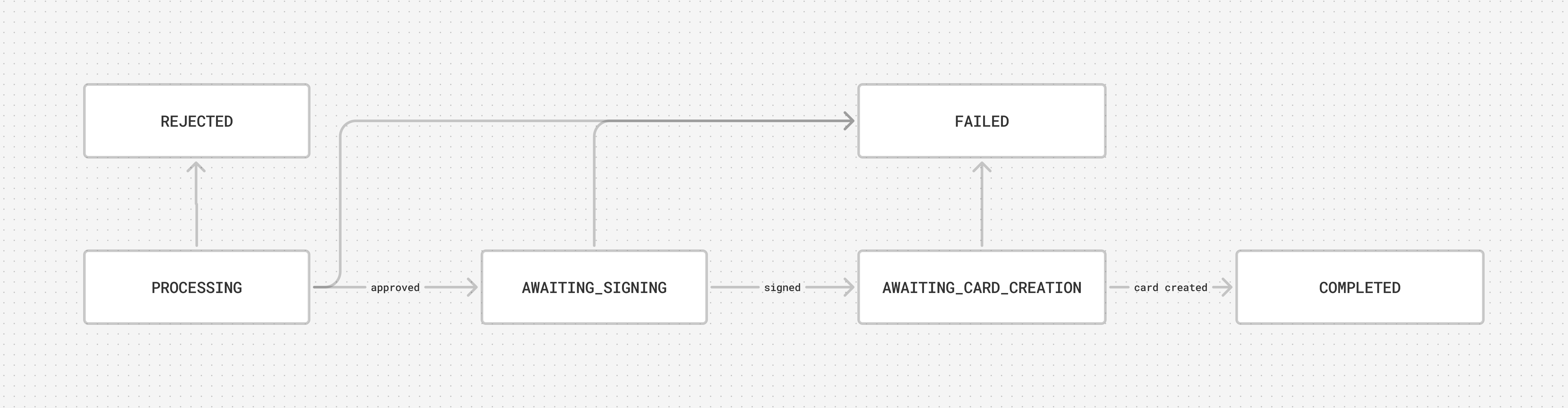 ### State Transitions
The onboarding process moves through defined states, each representing a specific phase:
Initial validation and automated checks in progress.
**Duration**: 3-10 seconds
**Next States**:
* AWAITING\_DOCUMENTS (documents needed)
* AWAITING\_SIGNING (approved)
* REJECTED (declined)
* FAILED (error)
Additional documentation required from applicant.
**Duration**: Customer-dependent
**Actions Required**:
* Notify customer of required documents
* Upload documents via POST /api/engagements/card/onboarding/{id}/documents
**Next States**:
* AWAITING\_DOCUMENT\_REVIEW (documents uploaded)
Documents submitted, under review.
**Duration**: 1-3 business days
**Next States**:
* AWAITING\_SIGNING (approved)
* REJECTED (invalid documents)
Application approved, waiting for customer signature.
**Duration**: Customer-dependent (max 30 days)
**Actions Required**:
* Redirect customer to signing URL
* Monitor for completion webhook
**Next States**:
* AWAITING\_CARD\_CREATION (signed)
* FAILED (signing expired/cancelled)
Documents signed, ready for card issuance.
**Duration**: Partner-dependent
**Actions Required**:
* Create Enfuce customer
* Create Enfuce account
* Order card
**Next States**:
* COMPLETED (card created)
* FAILED (creation error)
Onboarding finished successfully.
**Result**:
* Credit engagement active
* Card ordered/issued
* Customer can transact
Application declined during assessment.
**Reasons**:
* KYC\_DENIAL
* KYB\_DENIAL
* CREDIT\_SCORING\_DENIAL
* UNAUTHORIZED\_SIGNATORY (businesses only)
* INVALID\_DOCUMENTS
**Customer Action**:
* KYC issues: Our AML team will handle these manually and after review, the user can start new onboarding
* KYB issues: Business verification failed, contact support
* Credit issues: Recommend that you let the customer reapply after 3 months with new onboarding
* Signatory issues: Customer must provide proof of authorization to sign for the business
* Document issues: Re-upload valid documents
For both KYC and credit scoring denials, the current onboarding remains permanently in REJECTED status. Customers must initiate a completely new onboarding process with a new onboarding ID:
* **KYC denials**: After AML team review and approval
* **Credit denials**: After 3-month waiting period
Technical or validation error occurred.
**Error Codes**:
* INTERNAL\_ERROR
* ADDRESS\_MISMATCH
* NAME\_MISMATCH
* ID\_VERIFICATION\_FAILED
* TIMEOUT
## Webhook Implementation
The integration relies on webhooks to notify your system of status changes in real-time. When key events occur (approval, signing completion, etc.), Nordiska sends HTTP POST requests to your configured webhook endpoint.
**Key webhook events**:
* **SIGNING\_SESSION\_CREATED**: Application approved, customer needs to sign
* **SIGNING\_SESSION\_COMPLETED**: Customer finished signing documents
* **ONBOARDING\_COMPLETED**: Entire process completed successfully
* **ONBOARDING\_REJECTED**: Application declined during assessment
* **ONBOARDING\_FAILED**: Technical error occurred
For complete webhook implementation details, security requirements, and code examples, see our [Webhooks Guide](/card/webhooks).
***
For detailed API documentation and endpoint specifications, please contact your Nordiska integration specialist.
### State Transitions
The onboarding process moves through defined states, each representing a specific phase:
Initial validation and automated checks in progress.
**Duration**: 3-10 seconds
**Next States**:
* AWAITING\_DOCUMENTS (documents needed)
* AWAITING\_SIGNING (approved)
* REJECTED (declined)
* FAILED (error)
Additional documentation required from applicant.
**Duration**: Customer-dependent
**Actions Required**:
* Notify customer of required documents
* Upload documents via POST /api/engagements/card/onboarding/{id}/documents
**Next States**:
* AWAITING\_DOCUMENT\_REVIEW (documents uploaded)
Documents submitted, under review.
**Duration**: 1-3 business days
**Next States**:
* AWAITING\_SIGNING (approved)
* REJECTED (invalid documents)
Application approved, waiting for customer signature.
**Duration**: Customer-dependent (max 30 days)
**Actions Required**:
* Redirect customer to signing URL
* Monitor for completion webhook
**Next States**:
* AWAITING\_CARD\_CREATION (signed)
* FAILED (signing expired/cancelled)
Documents signed, ready for card issuance.
**Duration**: Partner-dependent
**Actions Required**:
* Create Enfuce customer
* Create Enfuce account
* Order card
**Next States**:
* COMPLETED (card created)
* FAILED (creation error)
Onboarding finished successfully.
**Result**:
* Credit engagement active
* Card ordered/issued
* Customer can transact
Application declined during assessment.
**Reasons**:
* KYC\_DENIAL
* KYB\_DENIAL
* CREDIT\_SCORING\_DENIAL
* UNAUTHORIZED\_SIGNATORY (businesses only)
* INVALID\_DOCUMENTS
**Customer Action**:
* KYC issues: Our AML team will handle these manually and after review, the user can start new onboarding
* KYB issues: Business verification failed, contact support
* Credit issues: Recommend that you let the customer reapply after 3 months with new onboarding
* Signatory issues: Customer must provide proof of authorization to sign for the business
* Document issues: Re-upload valid documents
For both KYC and credit scoring denials, the current onboarding remains permanently in REJECTED status. Customers must initiate a completely new onboarding process with a new onboarding ID:
* **KYC denials**: After AML team review and approval
* **Credit denials**: After 3-month waiting period
Technical or validation error occurred.
**Error Codes**:
* INTERNAL\_ERROR
* ADDRESS\_MISMATCH
* NAME\_MISMATCH
* ID\_VERIFICATION\_FAILED
* TIMEOUT
## Webhook Implementation
The integration relies on webhooks to notify your system of status changes in real-time. When key events occur (approval, signing completion, etc.), Nordiska sends HTTP POST requests to your configured webhook endpoint.
**Key webhook events**:
* **SIGNING\_SESSION\_CREATED**: Application approved, customer needs to sign
* **SIGNING\_SESSION\_COMPLETED**: Customer finished signing documents
* **ONBOARDING\_COMPLETED**: Entire process completed successfully
* **ONBOARDING\_REJECTED**: Application declined during assessment
* **ONBOARDING\_FAILED**: Technical error occurred
For complete webhook implementation details, security requirements, and code examples, see our [Webhooks Guide](/card/webhooks).
***
For detailed API documentation and endpoint specifications, please contact your Nordiska integration specialist.